What AI Logo Makers Actually Do
AI logo makers generate dozens of logo concepts from a business name, industry, and style preferences, then let you customise fonts, colours, and layout until something works. The category has grown substantially; the global AI logo generator market was valued at $333.2 million in 2023 and is projected to reach over $2 billion by 2033, and adoption has moved well beyond startups, with an estimated 40% of small businesses already using some form of AI for their visual branding.
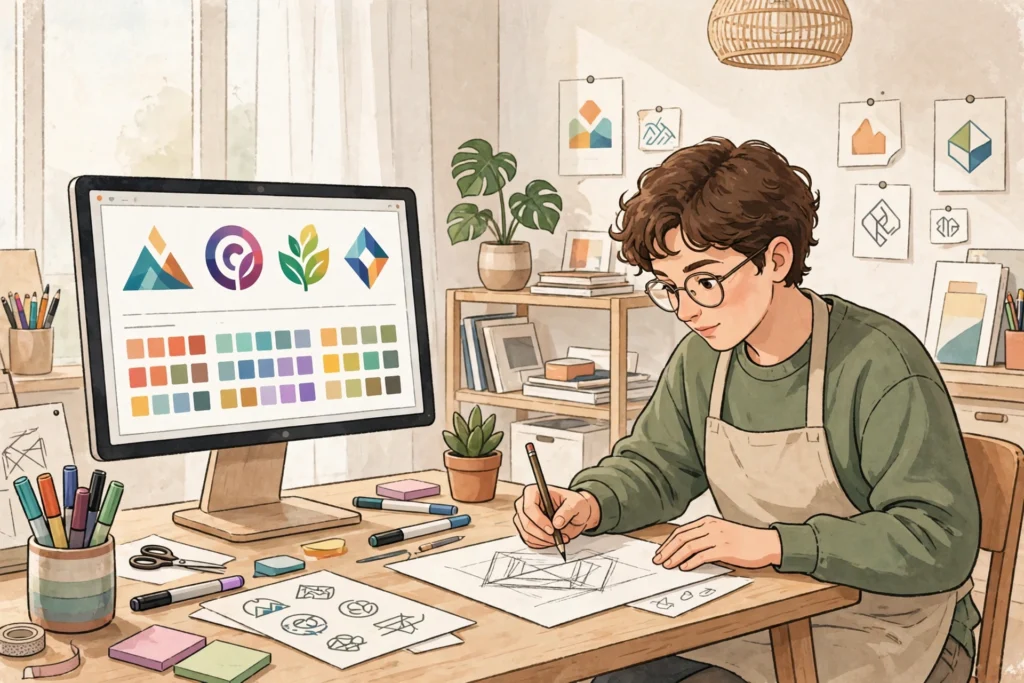
Two Different Approaches to AI Logo Generation
Template and Icon-Driven Tools
These combine large icon libraries with automation to assemble a logo quickly, prioritising speed and ease of use. Because many pull from shared icon libraries, results can end up looking similar to other businesses using the same tool.
Concept-Driven, AI-Native Generators
Newer tools generate original vector artwork from a text prompt rather than assembling pre-made icons, offering more originality but requiring more iteration to land on a final design. Advances in AI image models have also made these tools much better at rendering business names accurately within the logo itself, which was a major limitation as recently as 2024.
An Important Legal Note
Copyright status for AI-generated logos varies by jurisdiction and is genuinely unsettled in places. In the United States, the Copyright Office’s current position is that works generated entirely by AI without meaningful human creative input are not eligible for copyright protection, which matters for businesses wanting exclusive legal rights to their logo. Checking a platform’s specific commercial usage terms, and how much human creative input and editing you apply, is worth doing before treating an AI-generated logo as a fully protected asset.
What to Compare Across Logo Makers
| Factor | Why it matters |
|---|---|
| Vector file export (SVG/EPS) | Needed for scaling the logo across signage, print, and merchandise without quality loss; often gated behind higher-priced plans |
| Commercial usage rights | Confirm explicit commercial licensing terms, especially on free or low-cost plans |
| Custom vs template icons | Custom AI-generated icons are more original; template-based tools risk similarity to other businesses |
| Bundled branding tools | Many platforms now include business cards, social assets, and even website builders alongside the logo itself |
| Pricing model | Ranges from one-time fees to annual subscriptions; some genuinely free tiers exist with limited export options |
How to Choose the Right Tool
- Generate multiple concepts across two or three different tools before settling on a direction, since output style varies significantly between platforms
- Confirm vector export (SVG) is included if you’ll need the logo at large sizes for print or signage
- Check commercial usage rights explicitly, particularly on free tiers, before using a logo publicly
- If brand consistency across many assets matters, prioritise platforms offering a full branding ecosystem over a standalone logo tool
Frequently Asked Questions
Are AI logo makers free to use?
Several offer free logo creation or concepting, though full-resolution exports, vector formats, and commercial usage rights are commonly reserved for paid plans.
Can I get exclusive legal rights to an AI-generated logo?
This depends on jurisdiction and how much human creative input you apply during editing; in the US specifically, works generated entirely by AI without meaningful human input currently are not eligible for copyright protection.
Will my AI-generated logo look unique, or similar to other businesses?
This depends on the tool type: template and icon-driven generators risk similarity since many draw from shared icon libraries, while AI-native concept generators produce more original artwork from your specific prompt.
Do I need design experience to use an AI logo maker?
No, most tools are built for non-designers, using a short questionnaire or text prompt rather than requiring design software knowledge.
Looka vs Brandmark vs LogoAI: Prices and the Vector Trap
Looka is the best overall pick for most small businesses, and its pricing is the easiest to understand. Designing and previewing is free. The Basic package costs 20 dollars one-time and gives you PNG files only. The Premium package costs 65 dollars one-time and adds the files that actually matter: SVG, EPS and PDF vectors, transparent PNGs, colour and black-and-white variants, and full copyright. The Brand Kit subscription costs about 96 dollars a year and adds more than 300 branded templates for social posts, business cards, email signatures, invoices and letterheads. Looka wins because it treats the logo as part of a brand system, not a standalone image.
Brandmark is the pick if you want a more distinctive, less templated mark. Its one-time packages run from about 25 dollars for Basic to about 65 dollars for Designer and up to 175 dollars for Enterprise, with vector files in the paid packages. Reviewers consistently rate it the strongest of the three for colour palettes and font pairing, which is where a logo stops looking generated and starts looking designed. LogoAI is the cheapest full brand kit with no subscription at all. Its one-time packages run from 29 dollars for Basic to 59 dollars for Pro and 99 to 129 dollars for Brand, with vector files on the higher tiers and brand guidelines on the top package. Note that some listings now show a 20 dollar a month Pro subscription for LogoAI 2.0, so confirm the price at checkout before you pay.
The trap that catches most buyers is the vector file. A logo must be a vector, an SVG or EPS file, to be usable at every size, from a tiny favicon to a shop sign. A PNG-only package looks fine on a screen and fails the moment you need print, signage or merchandise, because a raster image goes blurry when it is enlarged. Vector export is gated behind the paid tiers on almost every tool, which is why the cheapest package is often a false economy. Paying 20 dollars for PNGs and then paying again for vectors costs more than buying the 65 dollar Premium package first. For context, a freelance logo costs 100 to 1,000 dollars and an agency brand package runs 1,500 to 30,000 dollars or more, so even the most expensive AI package is cheap by comparison. The question is not whether to spend 65 dollars, it is whether to spend it once or twice.
A Worked Example: The Same Brief on Three Tools
Give all three tools the same brief: a small coffee roastery called North Roast, warm and modern, no coffee bean cliché, works in one colour on a kraft paper bag. Looka returns the most polished set, with a clean wordmark and a matching brand kit that already includes a social post template and a business card. It is the fastest route from brief to a usable identity, and the guided style questions stop you drowning in options. Brandmark returns fewer concepts, but the best two are more distinctive, with a stronger colour system and a font pairing that feels chosen rather than assembled. It is the better pick if the logo itself matters more than the brand kit around it.
LogoAI returns the widest variety, including a few genuinely original marks, but also more misses, so expect to iterate longer before something lands. The one-time price means there is no subscription guilt while you take your time. The workflow that works best is to run the brief through two tools, not one, and compare the best five marks side by side. Then test the winner before you pay: print it at business card size and at A4 size, view it in one colour, and shrink it to 16 pixels square. If it survives all three tests, buy the vector package. If it fails any of them, the logo is not ready, whatever the tool says.
Is a free AI logo maker good enough for a real business?
For a first draft, yes. For a real business, usually not without paying for the vector files. Namecheap Logo Maker is the best free option, with free SVG export and no watermark, and Adobe Express is close behind. Canva is the best free starting point inside a full design suite, with Pro from about 13 dollars a month. A free logo works for a side project, a test landing page or an MVP. The moment the business has customers, a shop sign, packaging or printed material, you need the vector package and the commercial licence, which is where the paid tier earns its price.
Can I trademark an AI-generated logo?
Yes, but the protection comes from the trademark, not from copyright. In the United States, the Copyright Office position is that a work generated entirely by AI, without meaningful human creative input, is not eligible for copyright protection. A trademark is different: it protects the mark as a brand identifier in commerce, and you file for it yourself with the trademark office. Every AI logo tool is the same on this point. None of them can grant you a trademark, and none of them can stop someone else using a similar mark. Before you invest in packaging and signage, check that the name and mark are clear to use, and file the trademark application early.
Final Thoughts
AI logo makers have made professional-looking branding accessible without a designer’s budget, though the right tool depends on whether you prioritise speed and simplicity or original, concept-driven artwork. Checking vector export options, commercial usage rights, and the jurisdiction-specific copyright status of AI-generated work are all worth confirming before treating any AI logo as a final, fully protected brand asset.
Related reading: Best AI Website Builder and Cici AI Image Generator.
About the author: The AI Uptrend editorial team covers AI tools, platforms, and industry trends to help readers evaluate new technology with a clear, practical lens.